Empowering Minds with Tech Knowledge.

How to Connect Your WhatsApp Number with Meta API in Portal?

How to Connect Your WhatsApp Number with Meta API in Portal?

11/April/2026 14:00    Comments (0)     Share:        Bookmark

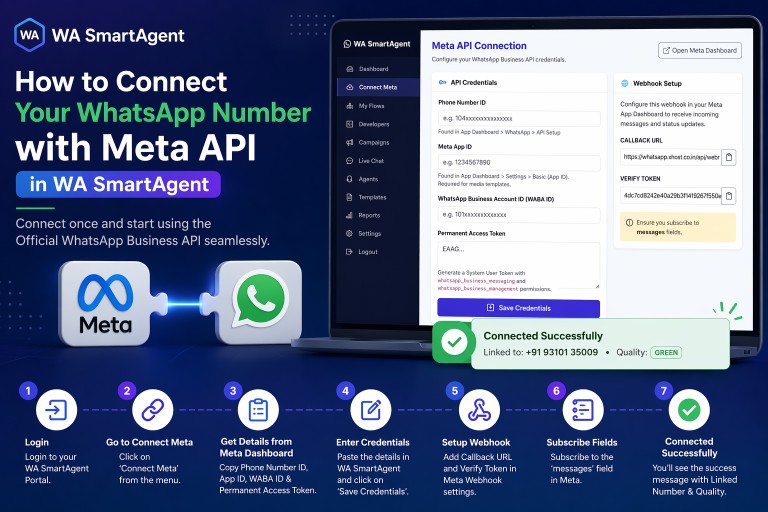
1. Log in to your WA SmartAgent Portal with your account credentials.

2. From the left menu, click on Connect Meta.

3. Get Details from Meta Dashboard. Open your Meta Developer Dashboard and collect the required credentials.
You will need:
a. Phone Number ID – Found in WhatsApp > API Setup
b. Meta App ID – Found in App Settings > Basic
c. WhatsApp Business Account ID (WABA ID)
d. Permanent Access Token – Generate System User Token with required permissions

4. Paste all the above details into the below form.


5. Copy the values shown on the right side:
a. Callback URL
b. Verify Token
Add these inside your Meta App Webhook settings.

6. In Meta Webhook settings, subscribe to the messages field.

7. After completing all details, click Save Credentials.

8. Once connected successfully, the page will show like below.


Important Note: Use a permanent access token for stable connection. Temporary tokens may expire and disconnect the API.


Comments (0)
Leave a Reply

Your email address and mobile will not be published.

Trending Blog
How to install SSL in cPanel?
16/October/2024 12:24
How to install SSL in cPanel?
How to setup a prime website?
09/January/2025 14:26
How to setup a prime website?
How to setup News/Blog website?
16/October/2024 22:55
How to setup News/Blog website?
How to setup basic website?
16/October/2024 19:04
How to setup basic website?
How to install software in aaPanel?
16/October/2024 18:13
How to install software in aaPanel?
How to install SSL in Vestacp Panel?
24/September/2024 17:12
How to install SSL in Vestacp Panel?
Related Blog

Subscribe our Newsletter